Overview
This manual provides detailed guidance on the setup and survey of a Ciholas Ultra-Wideband (CUWB) Real-Time Location System (RTLS) Anchor network.
Accurate anchor placement and survey are critical to Real-Time Location System (RTLS) performance, reliability, and precision. This manual provides step-by-step planning guidelines, anchor installation instructions, and survey procedures for the Ciholas Ultra-Wideband (CUWB) RTLS Anchor network.
For broader component placement guidance, refer to the Component Placement Guide.
This guide does not cover software installation in depth. To configure a Host PC with the CUWB Manager Package, see the CUWB Manager Installation instructions.
Planning Anchor Placement
A well-planned layout is crucial for mitigating common issues during CUWB system setup and achieving optimal performance. Follow these basic steps to create an effective plan for the anchor array layout:
- Draw/Model the Area of Interest:
- Create a scaled drawing of the tracking area. This can be on graph paper with quick measurements or in CAD software - accuracy is less critical at this stage. The purpose of this drawing is to visualize coverage and anchor placement. Be sure to include walls and significant obstructions, such as heavy machinery, large metallic fixtures, and dense storage areas.
- If the tracking area has a complex ceiling, an additional section drawing of the space may be useful in visualizing the varying ceiling heights.
- Add Anchors to the Model:
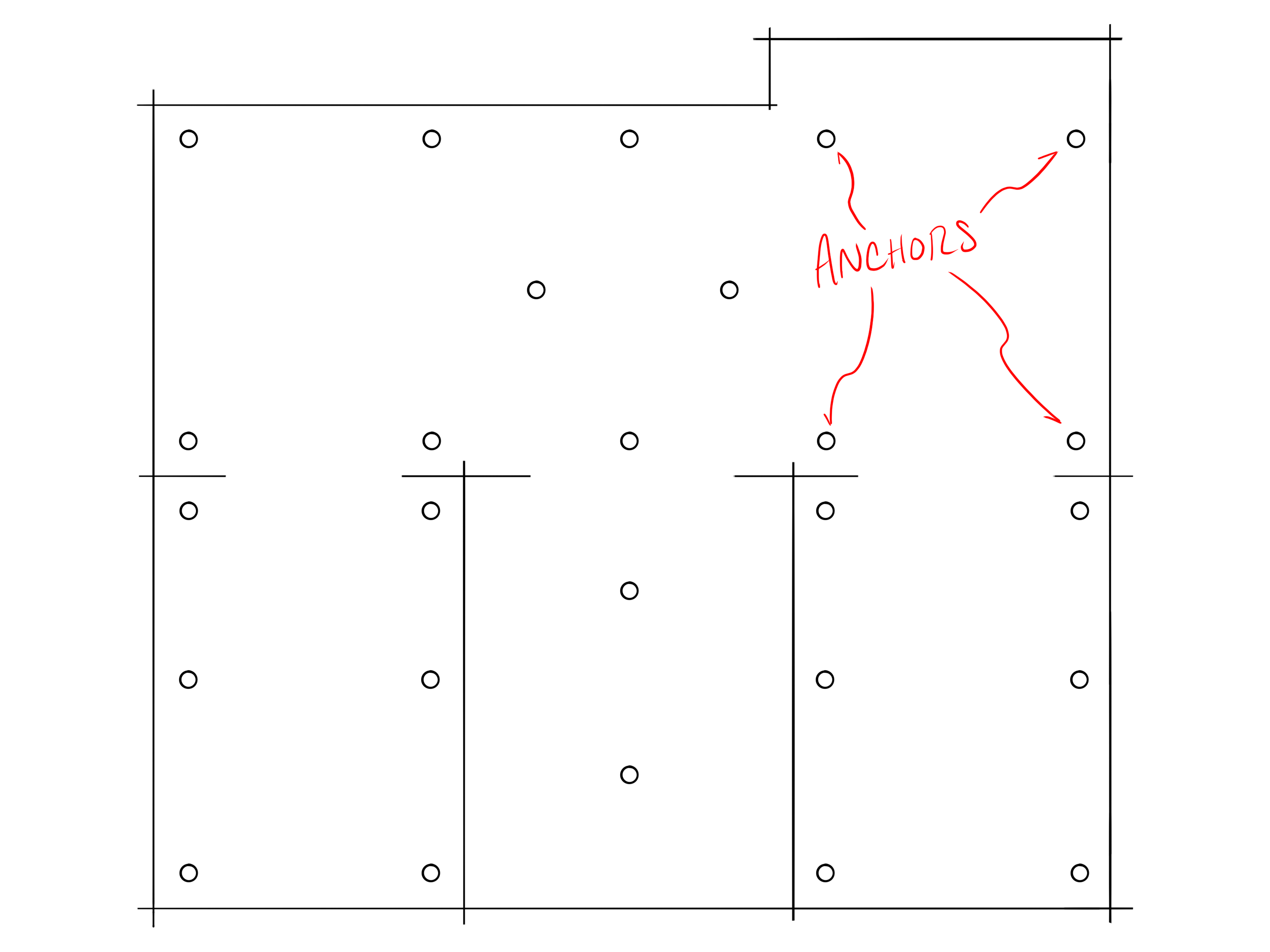
- Begin by marking points on the model that represent anchors. Place anchors around the perimeter of the space to ensure full coverage, then work towards the center.
- Space anchors 10–15 meters apart for MultiTime mode and 20-30 meters apart for MultiRange mode. See Density by Operation Mode for additional information.
- Anchors, particularly for MultiTime mode, should have Line-of-Sight (LoS) to multiple adjacent anchors where possible. See Line-of-Sight for additional information.
- Additional anchors may be required if there are obstructions in the space.
-
Evaluate the Placement:
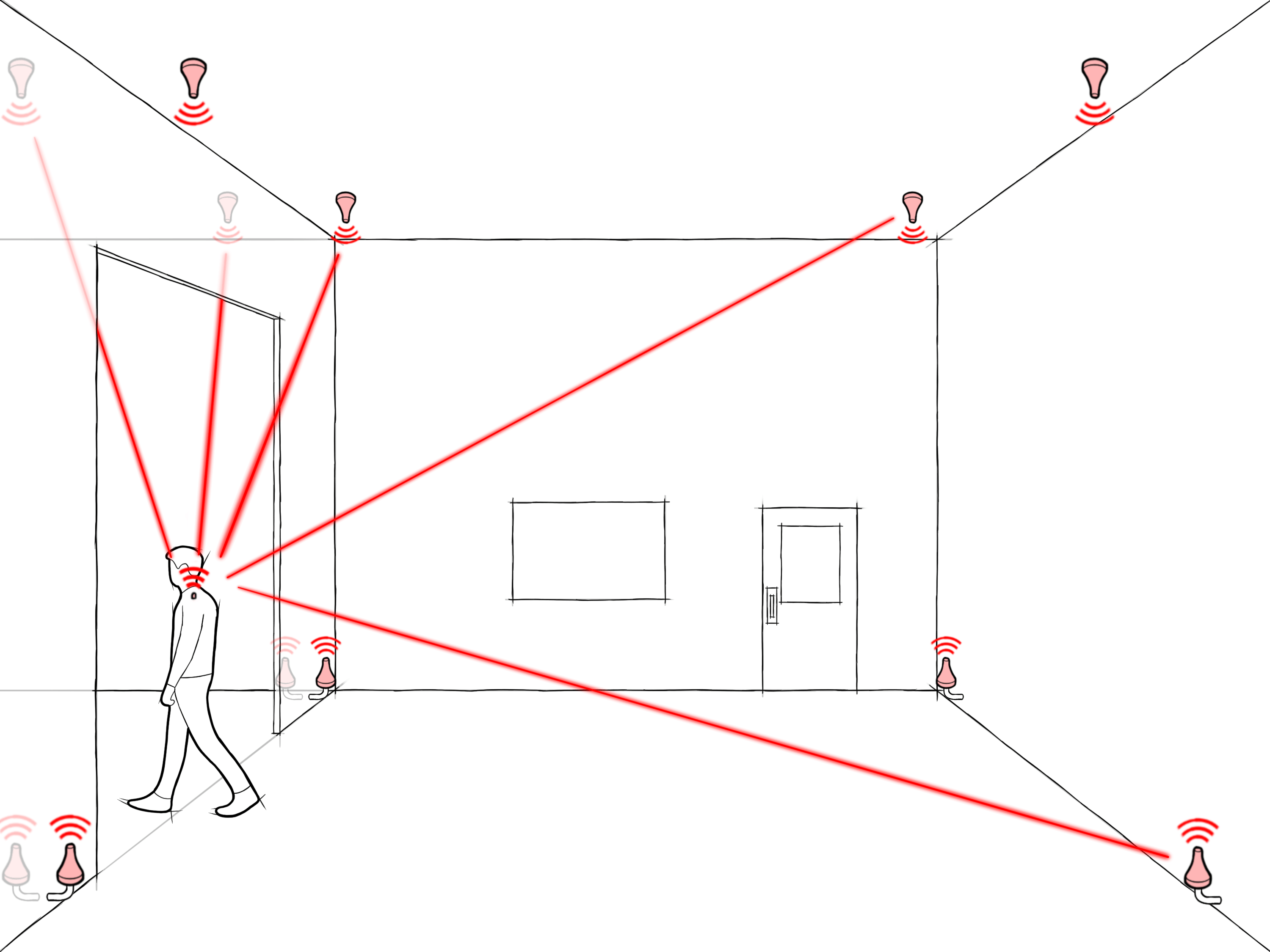
- Ensure anchors have good LoS to each other. LoS is essential to maintain network synchronization and ensure reliable performance across the anchor array.
- On the model, trace lines between anchors and ensure each anchor has clear visibility to several other anchors.
- Similarly, from a tag’s perspective, ensure that lines drawn from tag positions in the tracking area to nearby anchors are generally unobstructed.
- Tags should have LoS to a minimum of 4 anchors in all positions. For optimal performance, tags will have LoS to as many anchors as possible to mitigate interference issues and ensure best performance.
- Refine the Anchor Placement:
- Adjust anchor positions on the model based on observations made during the evaluation step.
- Continue to update the anchor plan as you work through both the evaluation and installation process. Often anchors will need to be shifted vertically or horizontally based on installation needs. It may become clear through the process when anchors can be removed or added for redundancy.
Placement Considerations
Several factors are crucial to ensuring that two UWB devices communicate effectively. The following sections provide guidance on evaluating the anchor placement plan for optimal performance. For additional considerations, see the Component Placement Guide.
- Line-of-Sight: The CUWB system uses high-frequency UWB RF signals, which do not penetrate certain materials. While UWB signals can pass through wood, MDF, and sheetrock, it is best to avoid these obstructions as much as possible. Metallic objects and objects with high water content, significantly attenuate or completely block UWB signals. Presence of these materials can reduce signal quality or cause loss of communications, resulting in poor timing and location performance.
- Multi-Path: UWB signals can reflect off nearby objects and surfaces. In most cases, this is not problematic; however, in some environments, these reflected signals (multi-path) can interfere with the direct path signal and negatively impact system performance.
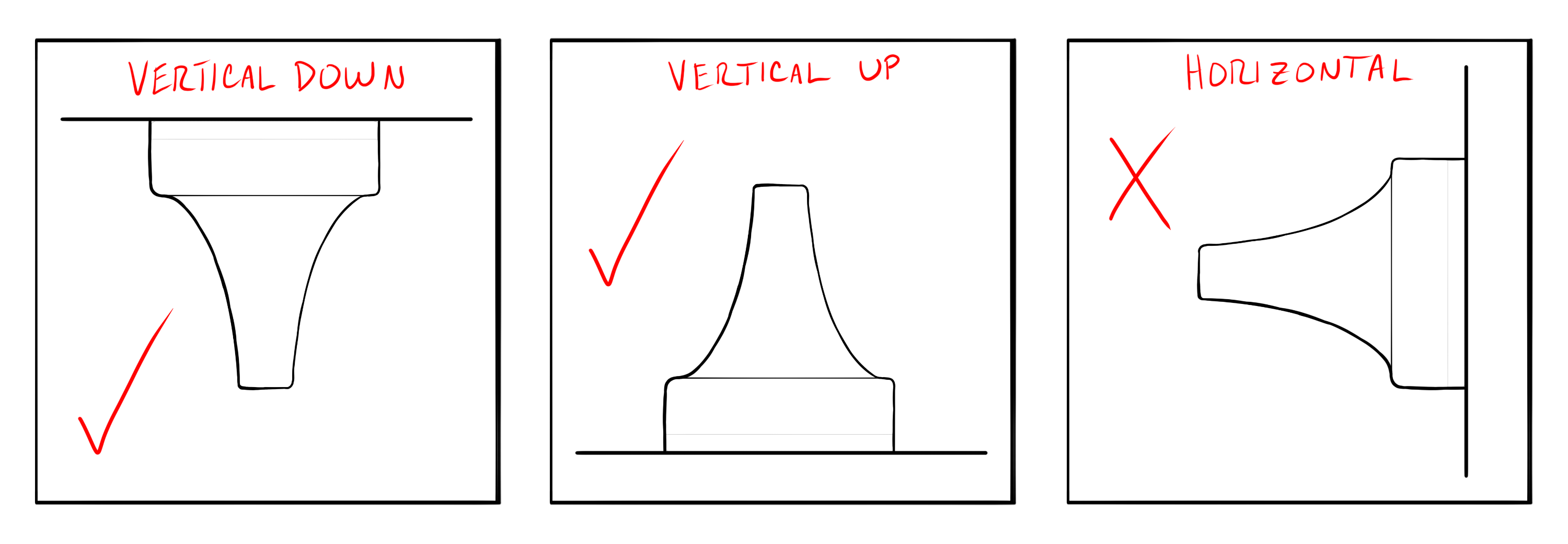
- Orientation: Anchors should generally be mounted vertically, facing directly down or directly up, to optimize antenna radiation.
- Environment: When evaluating anchor placement, consider local building codes relating to HVAC systems, fire safety equipment, security infrastructure, and lighting. These elements may introduce obstructions or restrict viable mounting locations for anchors.
Consider the above factors when assessing RF performance for anchor-to-anchor, as well as from tag-to-anchor, communication.
RTLS Considerations
Anchor positions set the baseline performance of the system. More anchor coverage in an area will result in more precise location output. The following tips can help with planning for optimal RTLS performance:
- Number of Anchors: The CUWB location engine requires that tag beacons be received by at least four anchors. While this is the minimum requirement, reception by more than four anchors improves the quality of the location output. The CUWB location engine implements occlusion mitigation by weighting anchor data based on signal quality. Occlusion mitigation works best with a larger number of anchors. It is generally recommended that a tag beacon be heard by eight or more anchors for high-precision position output.
- Height Variation and Angular Diversity: The best performance is achieved when the CUWB location engine has angular diversity between the tag and the anchors. To achieve this, avoid symmetrical installation patterns by varying the spacing and height of the anchors. For the best Z-axis performance, consider placing anchors at different heights and directly above key areas of interest.
- Accurate Survey: The CUWB location engine depends on accurate anchor positioning. Errors in anchor location will directly translate into errors in position outputs. Additionally, accurate anchor placement is required for participation in Global Network Time (GNT) calculations, which are essential for proper system synchronization.
What is Global Network Time (GNT)?
Anchors serve as static reference points used by the location engine to determine the location of a tag. Additionally, anchors participate in Global Network Time (GNT) calculations, which coordinate when CUWB devices transmit and receive data within the CUWBNet. For additional information, see the CUWB Manager Network Operation.
Cable Considerations
When planning anchor placement, consider how Ethernet cables will be routed to each location. Larger spaces, or spaces that are distant from the networking equipment, may require additional switches to meet Ethernet standard length requirements.
For expanded networking considerations and networking setup, see the Networking Guide.
Network Setup
The anchor array and network setup can be configured either before or during anchor installation. If the anchor network is available additional tools can be used for debugging and validation.
For additional details on network layout options and configuration, see the Networking Guide.
Network Considerations
- Ciholas recommends using CAT5 or higher performing cabling.
- Cables should be less than 100 meters in length.
- Anchors can be chained together or run directly to the PoE switch.
- Cables should be fully snapped into the anchor ports.
- Check cables for retention clip damage prior to use.
- The anchor array should be isolated from any additional infrastructure networks. See the Isolation Section for additional details.
Anchor Installation
Proper mounting and installation of anchors is important to a fully functioning system. Anchors should be securely mounted to prevent movement after installation, and to ensure the safety of personnel and equipment in the tracking area. Ciholas provides a variety of mounting options to meet the needs of any environment.
For first time users or temporary deployments: It is recommended to use tripods for initial installation to avoid permanently modifying building infrastructure and allow for easier adjustment during setup.
Anchors are designed to operate with the nose cone pointed downward toward the floor (vertically downward). For optimal performance, keep the majority of Anchors in a similar orientation:
Installation Tips
During installation, environmental conflicts may be encountered. It is common to adjust anchor placement to accommodate unforeseen constraints or installation challenges.
Common anchor adjustments include shifting anchors vertically or horizontally, as well as adding additional anchors when needed.
When installing anchors, it is helpful to record a common name, general location, and serial number, as this information will be required later during the CUWB manager configuration:
ANT01, near the door on north-east wall, XX:YY:ZZZZ
A common system setup issue is recording the incorrect serial number for a particular anchor.
Anchor Survey
Accurate surveying of installed anchor is critical to overall CUWB System performance. If anchor locations are not precisely measured during the survey, the RTLS will not produce accurate location data for tracked items.
In general, the survey process is as follows:
- To start the survey, envision an XYZ coordinate grid over the site of interest. Select a point to serve as the origin (0,0,0) of this grid.
- Measure each anchor’s position relative to the origin point, or to a secondary reference point.
- Record these measurements along with each anchor’s serial number and assigned common name.
All survey measurements should be recorded in meters, using a full stop as the decimal separator and no thousands separator (i.e., 10 or 50.1 or 1010.38).
Coordinate Systems
- Anchors’ XYZ coordinates are established in a right-handed Cartesian coordinate system.
- Select a clear and easily measurable point as the origin (0,0,0). A room corner or structural reference point often works best. This reference point should be visible after any additional construction if the building is under construction at time of anchor install.
- Clearly define the X, Y, and Z axes. Ideally the axes should align logically with the environment (along walls, floors, ceiling, etc.).
- User applications may require a translation of the output data and should be considered when selecting the origin and axes.
Game engines and other applications that consume CUWB RTLS data may use a different coordinate system. Many modern game engines use a left-handed coordinate system and may define the Z-axis as “up”, which differs from the CUWB right-handed system.
Survey Methods
Surveys can be conducted in a variety of ways. This section outlines common methods, though not all methods may be suitable for every installation.
Plumb Bob & Tape Measure
For a manual survey, a traditional plumb bob and metric tape measure can be used. This method can also be used with laser plumb bobs and laser range measures.
To conduct a survey with a plumb bob and tape measure:
- Setup plumb bob according to manufacturer instructions if digital. If traditional, carefully hold the string against the anchor cone and drop the point to the floor.
- Mark the floor with painter’s tape or other appropriate marker.
- Using a tape measure or laser range measure, measure points back to the origin for X and Y.
- For Z, measure ceiling height and subtract the anchor antenna distance from the back plane of the device.
If using a laser range measure, note the reference point used for each measurement, as some devices allow measurements from different reference points on the unit.
Lidar Scanner
To conduct a survey with a lidar scanner:
- Setup the lidar scanner according to the manufacturer instructions in a location with direct Line-of-Sight to as many anchors as possible.
- Clear the space of easily movable objects that may block the lidar laser and, if possible, cover reflective surfaces such as glass with a non-reflective material.
- Set the lidar scanner to medium or high density.
- Scan the space.
- If necessary, reposition the scanner to capture areas not visible in the initial scan.
- Repeat scans as necessary.
- Use the lidar scanner software to stitch multiple scans together.
- Evaluate scan output files to determine anchor coordinates.
- If the lidar scanner origin is not acceptable, the coordinates can be mathematically adjusted.
Total Station
To conduct a survey with a total station theodolite:
- Setup the total station according to the manufacturer instructions in a location with direct Line-of-Sight to as many anchors as possible.
- Establish and measure: the coordinate system origin, backsight, and foresight using the total station.
- Measure each anchor that is directly visible from the total station.
- If necessary, reposition the total station to capture areas not visible from the initial setup.
- Reestablish and measure the original backsight or original foresight, along with any new foresight references.
- Measure each additional anchor that is directly visible from the new position.
- Calculate the anchor coordinates relative to the defined origin.
Measurement Points
For the most accurate survey, apply distance offsets to anchor measurements. These offsets translate the measurement from the exterior plastic housing to the center of the antenna element. These offsets are available in the respective anchor datasheets.
Survey Tips and Tricks
The following tips and tricks can help ensure an accurate survey:
- Keep it simple: The CUWB RTLS uses a 3-D Cartesian coordinate system. Ciholas recommends choosing an origin point that allows the use of positive coordinates as much as possible.
- Record Serial Numbers: Ensure anchor serial numbers are recorded as they need to be entered into the CUWB Manager along with the XYZ data. To avoid missing this information, consider adding serial numbers to the system drawing prior to installation.
- Select Origin and Axes: Carefully choose an origin and axes for the Cartesian XYZ coordinates by considering how the XYZ data will be used and displayed. Select an origin that is easily measurable.
- Reference Points: Identify and mark fixed, immovable objects in the environment as reference points. Measure these objects to assist with the survey. Reference points are particularly useful when direct measurement to an axis is not possible and can be used to verify the accuracy of the CUWB system’s output data. Additionally, reference points can be useful when surveying anchors in a space that is disjointed or a series of multiple rooms.
- Measure to the Antenna: Identify a point on the anchor device that is easily measurable and make any necessary corrections from that point to the antenna. The antenna location is typically defined relative to the device housing in the respective datasheet.
- System Drawing: Use the system drawing to document both XYZ data and anchor serial numbers for consistent reference throughout the survey and configuration process.
Software Setup
To configure a Host PC with the CUWB Manager Package, see the CUWB Manager Installation instructions.
Once the CUWB Manager Package is installed, the survey data, anchor serials, and anchor naming can be entered into the CUWB Manager Web Interface.
To access the CUWB Manager Web Interface:
- Open a web browser.
- Navigate to the IP address of the Host PC running the CUWB Manager software and append “:5000” if using default settings
- Example: http://xxx.xxx.xxx.xxx:5000
- Press Enter to load the CUWB Manager Web Interface.
IP Port 5000 can be modified during CUWB Manager package installation. If modified to a different port, append the new port instead of “:5000”.
The web interface can also be reached from another machine that has network access to the Host PC.
For a detailed walk-through, see the CUWB Manager Configuration Example.
Revision
| Version | Date | Change Description |
|---|---|---|
| 5.0.3 | 2026-05-01 | Grammar corrections, minor language updates |
| 5.0.2 | 2025-11-14 | Adding highlighted callout in Overview |
| 5.0.1 | 2025-10-31 | Correcting links, grammar corrections |
| 5.0.0 | 2025-09-15 | Initial preliminary release |